File Library
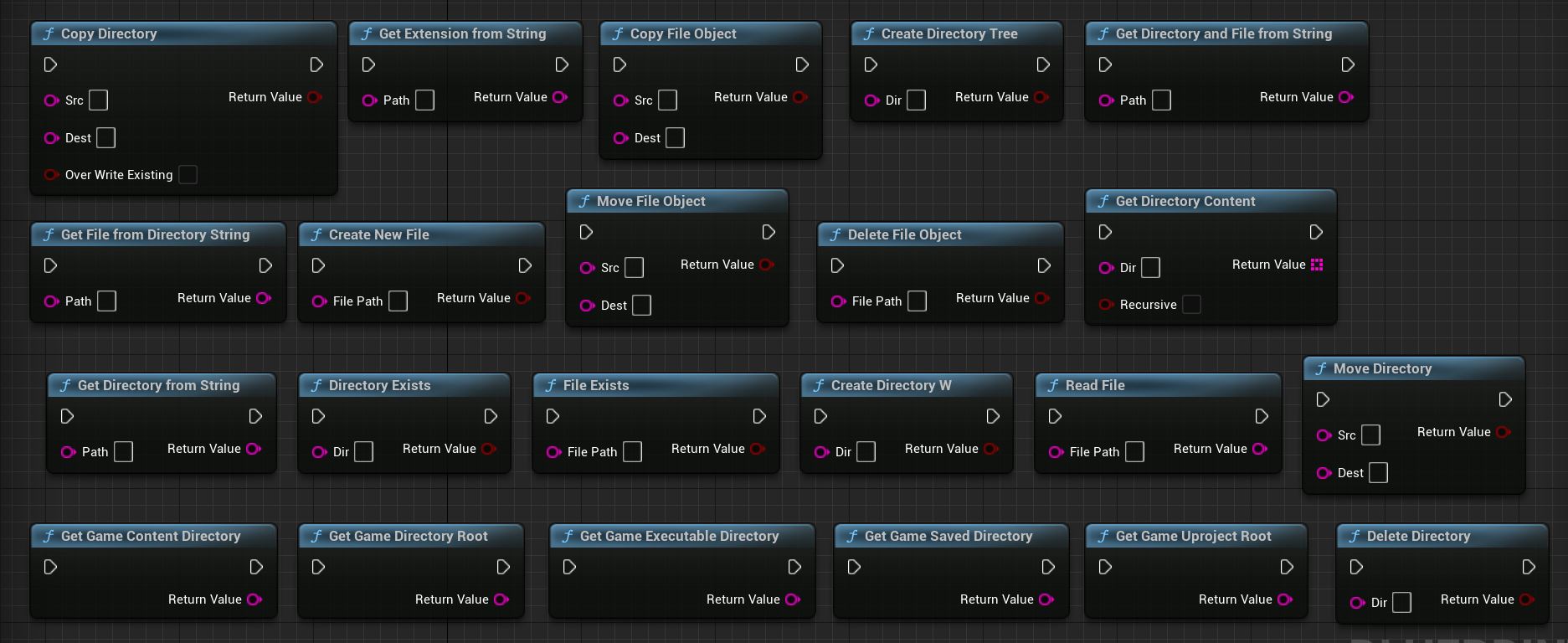
Copy Directory
Description: This method copies a directory from the source path to the destination path. It uses the IPlatformFile interface to perform the directory copy operation.
Input Parameters: - Src (const FString&): The source path of the directory to be copied. - Dest (const FString&): The destination path where the directory will be copied. - bOverWriteExisting (const bool): Specifies whether to overwrite existing files in the destination directory if they have the same name as files in the source directory.
Return Value: - Success (bool): Indicates whether the directory copy operation was successful.
Copy File Object
Description: This method copies a file from the source path to the destination path. It uses the IPlatformFile interface to perform the file copy operation.
Input Parameters: - Src (const FString&): The source path of the file to be copied. - Dest (const FString&): The destination path where the file will be copied.
Return Value: - Success (bool): Indicates whether the file copy operation was successful.
Create DirectoryW
Description: This method creates a new directory at the specified path. It uses the IPlatformFile interface to perform the directory creation operation.
Input Parameters: - Dir (const FString&): The path of the directory to be created.
Return Value: - Success (bool): Indicates whether the directory creation operation was successful.
Create Directory Tree
Description: This method creates a directory tree (including parent directories) at the specified path. It uses the IPlatformFile interface to perform the directory tree creation operation.
Input Parameters: - Dir (const FString&): The path of the directory tree to be created.
Return Value: - Success (bool): Indicates whether the directory tree creation operation was successful.
Create New File
Description: This method creates a new empty file at the specified path. It uses FFileHelper::SaveStringToFile to save an empty string to the file.
Input Parameters: - FilePath (const FString&): The path of the file to be created.
Return Value: - Success (bool): Indicates whether the file creation operation was successful.
Delete Directory
Description: This method deletes a directory at the specified path. It uses the IPlatformFile interface to perform the directory deletion operation.
Input Parameters: - Dir (const FString&): The path of the directory to be deleted.
Return Value: - Success (bool): Indicates whether the directory deletion operation was successful.
Delete File Object
Description: This method deletes a file at the specified path. It uses the IPlatformFile interface to perform the file deletion operation.
Input Parameters: - FilePath (const FString&): The path of the file to be deleted.
Return Value: - Success (bool): Indicates whether the file deletion operation was successful.
Directory Exists
Description: This method checks if a directory exists at the specified path. It uses the IPlatformFile interface to perform the directory existence check.
Input Parameters: - Dir (const FString&): The path of the directory to be checked.
Return Value: - Exists (bool): Indicates whether the directory exists.
File Exists
Description: This method checks if a file exists at the specified path. It uses the IPlatformFile interface to perform the file existence check.
Input Parameters: - FilePath (const FString&): The path of the file to be checked.
Return Value: - Exists (bool): Indicates whether the file exists.
Get Directory Content
Description: This method retrieves the content (files and directories) of a directory at the specified path. It uses the IPlatformFile interface to perform the directory content retrieval.
Input Parameters: - Dir (const FString&): The path of the directory to retrieve the content from. - bRecursive (bool): Specifies whether to retrieve the content recursively, including subdirectories.
Return Value: - FileList (TArray<FString>): An array of strings representing the content (files and directories) of the specified directory.
Get Directory And File From String
Description: This method extracts the directory and file name from a given path and returns the combined string. It uses FPaths::GetPath to retrieve the directory part of the path.
Input Parameters: - Path (const FString&): The path from which to extract the directory and file name.
Return Value: - DirectoryAndFile (FString): The combined string representing the directory and file name.
Get Directory From String
Description: This method extracts the directory part from a given path and returns it. It uses FPaths::GetPath to retrieve the directory part of the path.
Input Parameters: - Path (const FString&): The path from which to extract the directory.
Return Value: - Directory (FString): The directory part of the path.
Get Extension From String
Description: This method extracts the file extension from a given path and returns it. It uses FPaths::GetExtension to retrieve the file extension.
Input Parameters: - Path (const FString&): The path from which to extract the file extension.
Return Value: - Extension (FString): The file extension.
Get File From Directory String
Description: This method extracts the file name from a given directory path and returns it. It uses FPaths::GetCleanFilename to retrieve the file name.
Input Parameters: - Path (const FString&): The directory path from which to extract the file name.
Return Value: - FileName (FString): The file name.
Get Game Content Directory
Description: This method retrieves the directory path to the game’s content directory. It uses FPaths::ProjectContentDir to retrieve the path.
Return Value: - GameContentDirectory (FString): The directory path to the game’s content directory.
Get Game Directory Root
Description: This method retrieves the root directory path of the game. It uses FPaths::ProjectDir to retrieve the path.
Return Value: - GameDirectoryRoot (FString): The root directory path of the game.
Get Game Executable Directory
Description: This method retrieves the directory path to the game’s executable file. It uses FPaths::ProjectDir to retrieve the path and appends the “Binaries” subdirectory.
Return Value: - GameExecutableDirectory (FString): The directory path to the game’s executable file.
Get Game Saved Directory
Description: This method retrieves the directory path where the game’s saved data is stored. It uses FPaths::ProjectSavedDir to retrieve the path.
Return Value: - GameSavedDirectory (FString): The directory path where the game’s saved data is stored.
Get Game Uproject Root
Description: This method retrieves the root directory path of the game’s .uproject file. It uses FPaths::GetProjectFilePath to retrieve the path and then extracts the directory part using FPaths::GetPath.
Return Value: - GameUprojectRoot (FString): The root directory path of the game’s .uproject file.
Move Directory
Description: This method moves a directory from the source path to the destination path. It first copies the directory using PlatformFile.CopyDirectoryTree and then deletes the source directory using PlatformFile.DeleteDirectory.
Input Parameters: - Src (const FString&): The source path of the directory to be moved. - Dest (const FString&): The destination path where the directory will be moved.
Return Value: - Success (bool): Indicates whether the directory move operation was successful.
Move File Object
Description: This method moves a file from the source path to the destination path. It first copies the file using PlatformFile.CopyFile and then deletes the source file using PlatformFile.DeleteFile.
Input Parameters: - Src (const FString&): The source path of the file to be moved. - Dest (const FString&): The destination path where the file will be moved.
Return Value: - Success (bool): Indicates whether the file move operation was successful.
Read File
Description: This method reads the contents of a file at the specified path and returns them as a string. It uses FFileHelper::LoadFileToString to load the file contents.
Input Parameters: - FilePath (const FString&): The path of the file to be read.
Return Value: - FileContents (FString): The contents of the file as a string.